
Daystage Is Now WCAG 2.1 AA Compliant
As of today, Daystage is WCAG 2.1 AA compliant. Every newsletter you create, every email you send, and every public newsletter page your families visit now meets the Web Content Accessibility Guidelines 2.1 Level AA standard.
This is not a checkbox. It changes what your school can confidently say to families with disabilities, to districts with accessibility mandates, and to parents who rely on assistive technology to read your updates.
Why this matters for your school right now
Accessible school communication is moving from best practice to legal requirement. Colorado set a 2025 deadline for web content accessibility in education. Federal regulations expected by April 2026 are likely to require WCAG 2.1 AA compliance for K-12 digital communications. Districts that wait are going to face a scramble.
With Daystage, your newsletters are already compliant. You do not need to audit your tools, file a remediation plan, or send a separate accessible version to families who need one. Every newsletter you publish meets the standard by default.
What we built to meet the standard
WCAG 2.1 AA has 50 success criteria. We audited every part of the platform against them. Here is what changed.
Keyboard navigation throughout the editor
Every action in the Daystage editor is now reachable by keyboard. Block controls, the block picker, the style panel, the send modal, and the password protection modal all support full Tab and Shift+Tab navigation. A visible focus ring (2px indigo outline) appears on every focused element so keyboard users always know where they are.
The send modal and password modal now trap focus. When a dialog opens, focus moves into it and stays there until you close it. This is a Level A requirement (WCAG 2.1.2) that many tools skip. We did not.
Color contrast across all themes
WCAG 2.1 AA requires a contrast ratio of at least 4.5:1 between text and background. We audited all four newsletter themes (Modern, Warm, Minimal, Bold) against this standard. The Warm theme had an amber accent color that scored 3.13:1 on white backgrounds. We updated it to a darker amber that scores 4.93:1. All themes now pass.
Alt text warnings before you send
If your newsletter contains images without alt text, Daystage now shows a warning before you send. You can still send, but you will know the issue exists. For families who use screen readers, alt text is the only way to understand what an image shows. A blank alt text field means the image is invisible to them.
Accessible public newsletter pages
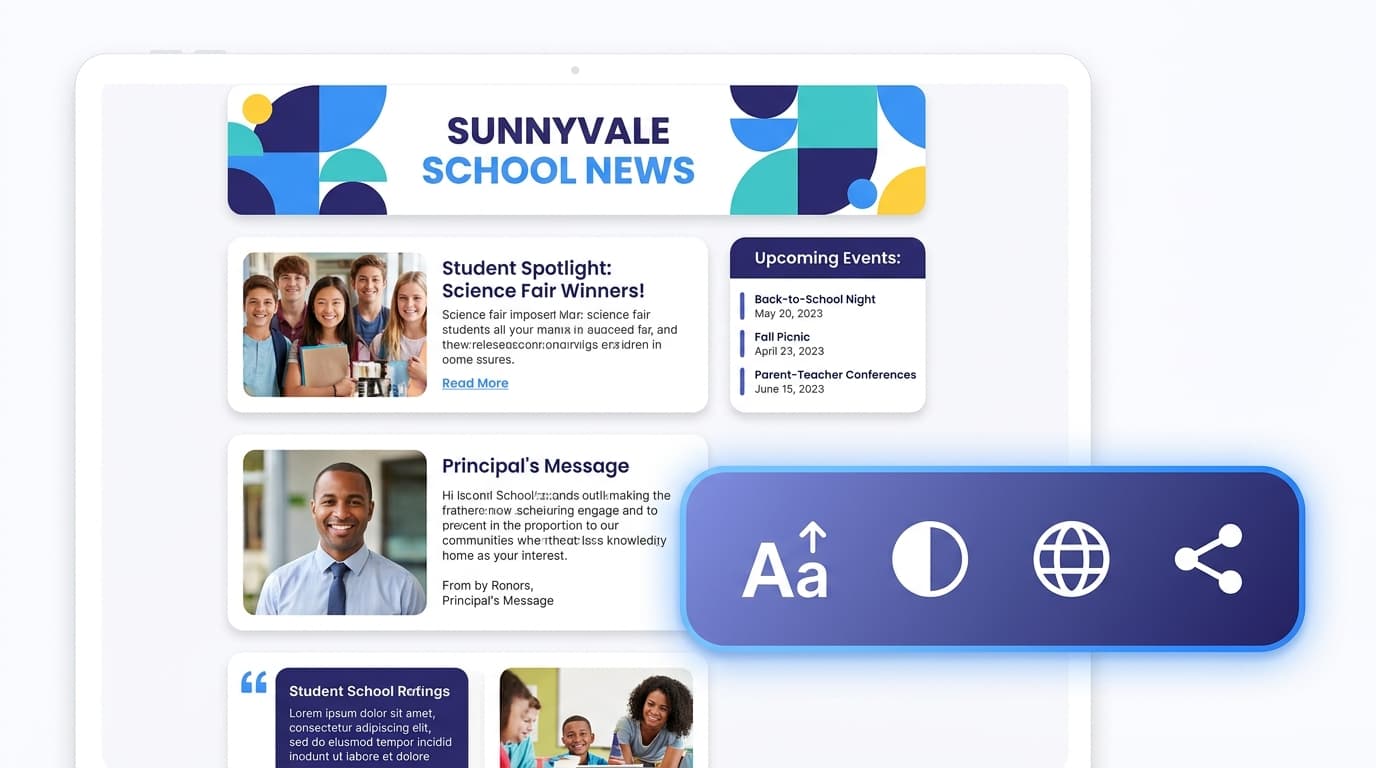
Every newsletter published on a Daystage public page now includes a floating accessibility toolbar. Families can:
- Increase text size (three levels: normal, large, extra large)
- Switch to high contrast mode, which removes the hero image and forces black text on a white background
- Translate the newsletter via Google Translate
- Share the newsletter link directly
The public newsletter page also includes a skip navigation link that keyboard users can activate with the Tab key to jump directly to the newsletter content, skipping the header and toolbar.
Screen reader compatibility
Every interactive element in the editor now has a proper ARIA label. Block drag handles, duplicate buttons, delete buttons, the block picker menu, and the slash command menu all announce themselves correctly to screen readers. The save status dot has an aria-live region so screen readers announce save state changes without interrupting what the user is doing.
What this means for families
For a parent using VoiceOver on an iPhone to read your newsletter, Daystage now works. For a grandparent with reduced vision who needs larger text, the accessibility toolbar is one tap away. For a non-native English speaker, the translate button takes them directly to a Google Translate version of the page.
None of these features require anything extra from you. You create the newsletter the same way you always have. Accessibility is part of how Daystage works, not an add-on you have to configure.
What comes next
We will keep auditing as we add features. Every new block type, every new editor control, and every new page goes through the same accessibility checklist before it ships. WCAG 2.1 AA is the floor. We are building toward AAA for the criteria that matter most in school communication, including reading level, language clarity, and timeout warnings.
If you are a district leader evaluating communication tools against accessibility mandates, Daystage is ready. If you are a teacher who has been told your current tool does not meet your district's accessibility requirements, it is worth a look.
Get one newsletter idea every week.
Free. For teachers. No spam.
Frequently asked questions
When did Daystage achieve WCAG 2.1 AA compliance, and what triggered the decision?
Daystage achieved WCAG 2.1 AA compliance in 2026. The decision was driven by growing state accessibility mandates for school technology vendors and the practical reality that many school families include members with visual, motor, or cognitive disabilities who depend on accessible digital communication.
What does WCAG 2.1 AA compliance include in the context of school email newsletters?
WCAG 2.1 AA covers color contrast ratios of at least 4.5 to 1 for body text, keyboard navigability, alt text requirements for images, sufficient font sizes, and screen reader compatibility. For email specifically, it means newsletters are readable using assistive technology that many families already rely on.
How does a school newsletter tool's WCAG compliance affect the emails teachers send to parents?
When a newsletter tool is WCAG 2.1 AA compliant, the underlying email framework produces output that meets accessibility standards by default. Teachers do not need to manually check contrast or structure. The tool handles the technical requirements so the newsletters it generates are accessible without extra steps.
What are common accessibility failures in school email newsletters?
Low contrast between text and background colors is the most common failure, often caused by light gray text on white backgrounds. Missing alt text on images is another frequent problem. A third is using images of text instead of actual HTML text, which makes content invisible to screen readers and unsearchable.
What is the best tool for schools that need accessible newsletters without requiring teachers to know accessibility standards?
Daystage builds WCAG 2.1 AA compliance into the newsletter framework itself. Teachers write content in a structured editor and the underlying MJML email code meets the standard automatically, including contrast, semantic structure, and screen reader compatibility.

Adi Ackerman
Author
Adi Ackerman is a former classroom teacher and curriculum writer with 8 years in K-8 schools. She writes about school communication, parent engagement, and what actually works in real classrooms.
More for Guides
Ready to send your first newsletter?
3 newsletters free. No credit card. First one ready in under 5 minutes.
Get started free