

School District Newsletter Branding Guide: Consistency Across All Schools
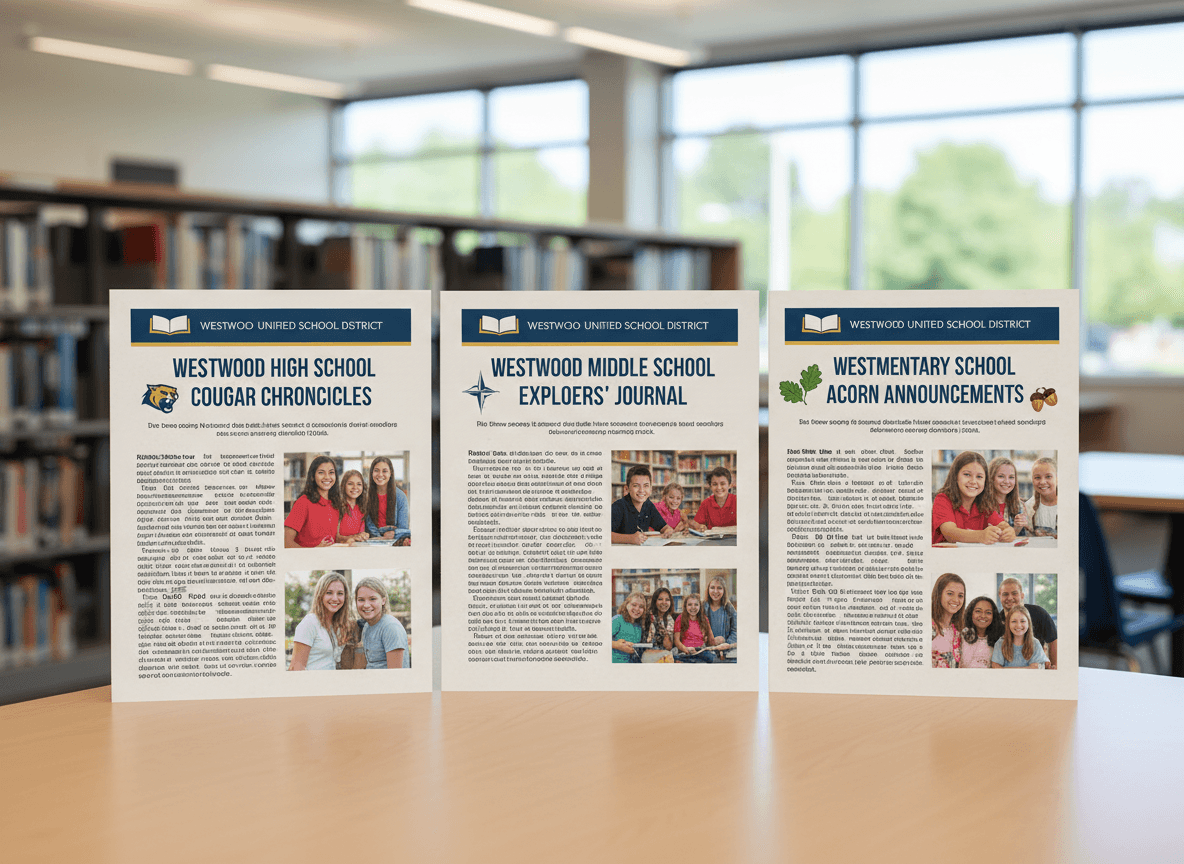
A family who receives newsletters from three different schools in the same district should immediately recognize that all three come from the same organization. When they do not, when each school newsletter looks like it was designed independently by whoever had time that week, the district signals something it probably does not intend to signal: that it does not have a coherent communication strategy, or that individual schools operate as independent entities with no connection to a unified system. District newsletter branding solves this, and it is one of the more practical improvements a communications director can make without a large budget or a long implementation timeline.
Why Branding Consistency Builds Trust
Branding consistency in newsletters is not primarily an aesthetic concern. It is a trust-building mechanism. When families consistently see the same visual treatment across every communication from the district, they develop recognition: they know what the newsletter looks like before they read it, which means they are more likely to open it. They know it comes from an authoritative source, which means they are more likely to act on it. And when a critical communication goes out (a safety notice, a required legal disclosure, a budget update), that recognition ensures families treat it as official rather than filtering it as promotional or spam.
Inconsistency has the opposite effect. Families who receive newsletters with different logos, different color schemes, and different formatting from different schools in the same district develop no consistent recognition. Each newsletter has to work harder to establish its credibility from scratch. Over time, the communications that look the least polished get the least attention, even when their content is the most important.
Building the District Newsletter Style Guide
A district newsletter style guide is the written foundation of the branding system. It tells anyone producing a newsletter in the district exactly what they need to know to produce something that meets brand standards. The guide needs to be practical and short enough that people will actually read it. Two to four pages works well. A forty-page brand manual does not.
The core elements a district newsletter style guide should cover:
- Logo: approved versions (full color, single color, reversed), minimum size, required clear space, prohibited uses (stretching, recoloring, placing on busy backgrounds)
- Color palette: primary and secondary colors with hex codes, background color guidance, approved accent colors for school-level customization
- Typography: approved fonts (usually one for headings, one for body text), sizing guidelines, and web-safe fallbacks for email clients that do not load custom fonts
- Header format: what appears in the header, in what order, and in what layout, so every newsletter opens the same way
- Image standards: acceptable aspect ratios, minimum resolution, and guidelines for student photos including release requirements
- Tone and voice: what the district sounds like in writing, what language to avoid, and how formal or informal the tone should be
- Content structure: what sections are required and what order they appear in
Designing the Template: Fixed vs. Flexible Elements
The newsletter template is the practical implementation of the style guide. Its design determines whether the branding system actually works at scale, because schools will use the template whether or not they have internalized the style guide. The template needs to make the right thing easy and the wrong thing hard.
Fixed elements are the parts of the template that every school newsletter must use without modification: the district logo in the header, the primary color application, the approved fonts, and the footer structure. These elements should be locked in the template wherever technically possible so they cannot be changed by individual school staff.
Flexible elements are the parts schools can customize to reflect their own identity: the school name and mascot in a designated zone, a school-specific accent color within the approved palette range, the specific photos and content in the body sections, and any school-specific recurring sections beyond the required ones. The template should make these customization zones obvious and inviting so schools feel the template serves their needs, not just the district's.
What a Branded District Newsletter Template Includes
A well-designed district newsletter template for email includes several key structural zones. The header zone contains the district logo, the school name and logo (in a designated secondary position), and the issue date. The header should be recognizable at a glance, with the most important brand elements above the fold on both desktop and mobile.
The body uses a consistent font treatment: one size and weight for section headings, one for body text, and a clear hierarchy that guides the eye through the content. The column structure should be simple: one or two columns that render cleanly across email clients and at mobile widths. Complex multi-column layouts often break on older email clients or mobile, which undermines the polished impression the branding is meant to create.
The events section uses a standardized format: date, event name, location (or "all schools"), and a one-line description. The footer includes the district name, address, and contact information, along with an unsubscribe link and any required legal language. The footer is also where the district can include links to its website, social media accounts, and any other channels families should know about.
Giving Schools Flexibility Without Losing Consistency
The tension in any district branding system is between consistency and flexibility. A completely rigid template that leaves no room for school identity will be resisted by schools that want their newsletter to feel like theirs. A completely open system that only recommends brand elements will produce inconsistent output within weeks. The design of the template is where this tension gets resolved.
The most successful district newsletter branding systems give schools a meaningful amount of control over their identity zones, including their school logo, mascot, and school color as an accent, while maintaining strict control over the district-level elements. Schools should feel that the template helps them look more professional than they could achieve independently, which makes adoption easier than if the template feels like a constraint imposed from above.
Distributing and Enforcing the Brand Standards
A style guide and template are only useful if people have them and use them. Distribution needs to be active, not passive. Do not post the style guide on the district intranet and assume principals will find it. Send it directly to every person who produces a newsletter in the district, including principals, administrative assistants, and any school-level communications staff. Include a brief walkthrough, either in person at a principals meeting or in a short recorded video, of what the standards require and where to find the templates.
For a district with many schools, some form of review process helps maintain quality over time. This does not need to be formal approval of every newsletter before it sends. A periodic audit, reviewing a sample of recent newsletters from each school twice a year, identifies schools that have drifted from standards before the drift becomes entrenched. Feedback delivered as a helpful note rather than a compliance notice is more effective at getting schools back on track.
Updating the Brand System Over Time
District branding evolves: logos get refreshed, strategic plan priorities shift, and communication standards change as the district's audience and channels change. When the brand system is built on a platform where the district office controls the master template, updates can be pushed to all schools simultaneously rather than requiring each school to update its own template files.
Plan for at least one annual review of the district newsletter template and style guide. Check whether the template renders correctly on current mobile devices and email clients, since both change regularly. Review whether the tone and voice guidance still reflects how the district wants to communicate. And ask the principals and school staff who use the template what is working and what is getting in their way, because the people closest to the daily production process usually have the most useful feedback about what the system needs.
Get one newsletter idea every week.
Free. For teachers. No spam.
Frequently asked questions
Why does newsletter branding consistency matter for school districts?
Consistent newsletter branding signals to families that communications come from a trustworthy, organized institution. When newsletters from different schools in the same district look visually unrelated, families unconsciously process the district as fragmented and unprofessional, even if the content is strong. Consistent branding builds recognition: families who see the district logo and color palette in a newsletter know immediately what they are reading and where it comes from, which increases open rates and attention. For districts managing required legal notices, visual consistency also makes it harder for important communications to get dismissed as spam or promotional mail.
What should a district newsletter style guide include?
A district newsletter style guide should cover the logo (approved versions, minimum sizes, clear space requirements, prohibited uses), the color palette (primary and secondary colors with hex codes), typography (one or two approved fonts and when to use each), header format (how the newsletter header should be structured, what appears above the fold), image standards (acceptable image ratios, quality minimums, guidelines for student photos and releases), tone and voice guidelines (what the district sounds like, what language to avoid), and content structure (what sections a standard newsletter should include and in what order). The guide should be a practical working document, not a lengthy brand manual. Two to four pages is the right length for a document that school administrators will actually use.
How do you give individual schools flexibility within district brand standards?
The key is separating the fixed elements from the flexible elements. Fixed elements, which every school newsletter must use, include the district logo placement, the primary color palette, the approved fonts, and the header format. Flexible elements, which schools can customize, include the school's own logo or mascot in a designated area, school-specific accent colors within an approved palette range, photo choices, and the specific content sections beyond required ones. A well-designed template makes this intuitive: fixed elements are locked or pre-populated, and flexible elements are clearly designated as the school's space. Schools that feel the template allows for their identity are more likely to use it consistently than schools that feel forced into a layout with no personality.
What does a branded district newsletter template include?
A branded district newsletter template includes a header zone with the district logo, school name, and issue date in a fixed layout; a primary content area with consistent font sizing and column structure; an events section with a standardized format for date, title, and brief description; a footer with district contact information, unsubscribe link, and required legal language. The template should be designed to look professional at all common email client widths, including mobile. It should also include a text-only fallback for email clients that do not render HTML. Schools should receive the template as a ready-to-use file in the district's newsletter platform, not as a Canva file or Word document that requires reformatting before use.
What tool helps school districts maintain newsletter branding consistency across all schools?
Daystage is built for exactly this use case. The district office sets the master brand template, including logo placement, color palette, fonts, and header format, and individual schools publish their newsletters within that framework. Schools get flexibility in their content sections while the district controls the visual brand elements. Administrators can push template updates to all schools at once rather than chasing individual schools to update their files. Open rate and engagement data is visible at both the school level and the district level, so the communications director can see how the branded newsletter program is performing across the entire system.

Adi Ackerman
Author
Adi Ackerman is a former classroom teacher and curriculum writer with 8 years in K-8 schools. She writes about school communication, parent engagement, and what actually works in real classrooms.
More for District
Ready to send your first newsletter?
3 newsletters free. No credit card. First one ready in under 5 minutes.
Get started free