

Best Free School Newsletter Builder for Teachers (2026)
A quick Google search for "school newsletter builder" returns a long list of tools. Most of them make the same promises: easy to use, beautiful templates, parents will love it. After building a school newsletter platform and talking to hundreds of teachers, I can tell you what actually separates a useful tool from one that wastes your Sunday evening.
This guide covers the five things that matter most when choosing a school newsletter tool, what the free plan should actually include, and why the email delivery method is the most important factor most teachers overlook.
What most school newsletter tools get wrong
Most tools are built by marketing teams for marketing people. The vocabulary, the features, and the workflow all assume you are running a business campaign, not sending a quick update to 30 families about the science fair next Thursday.
Teachers who use these tools typically spend 30-60 minutes on what should take 5-10. That is not a user failure. It is a product failure.
The five things that matter most for a teacher choosing a newsletter tool:
- How the email actually gets delivered to parents
- How fast you can send a repeat newsletter
- Whether the free plan is actually usable
- Whether school branding is locked in or requires manual work each time
- Whether the tool speaks the language of teachers, not marketers
1. Email delivery: inline vs. link-based
This is the most important feature and the one that gets the least attention in tool comparisons. There are two ways a newsletter tool can deliver your newsletter to parents:
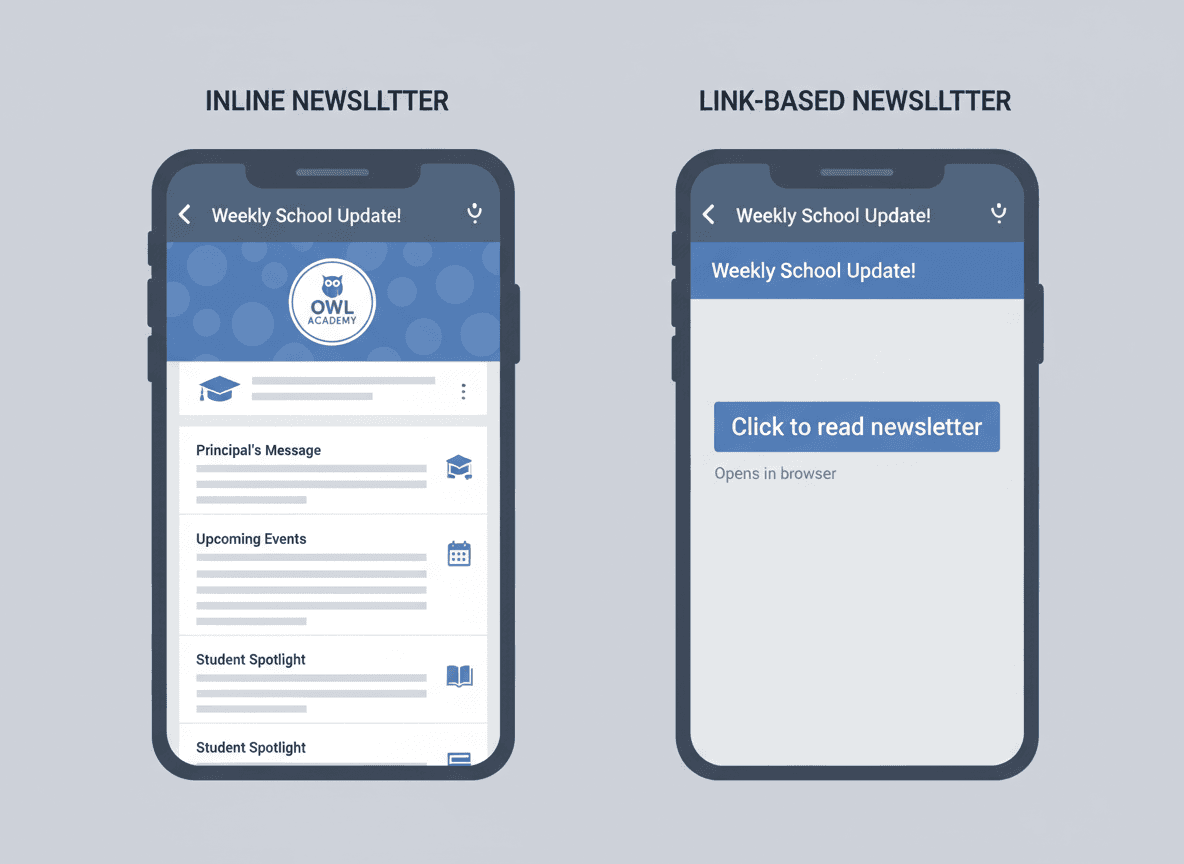
Link-based delivery: The tool sends an email that says something like "Your newsletter is ready, click here to read it." Parents open the email, see a link, and have to tap it to read the newsletter in a browser. In testing and teacher reports, roughly half of parents who open the initial email do not follow the link. The newsletter is not reaching them.
Inline HTML delivery: The newsletter itself is the email. Parents open their Gmail, Outlook, or Apple Mail and the formatted newsletter is right there. No link, no browser, no second step. Open the email, read the newsletter.
Inline HTML delivery requires compiling the newsletter into a format that renders correctly across different email clients, which is technically non-trivial. Most consumer newsletter tools do not do this by default because it is harder to build. But for parent engagement, the difference is significant.
When you evaluate any newsletter tool, find out: does it send parents the actual newsletter, or does it send them a link to a webpage? If the answer is a link, factor that into your expected open rate.
2. How fast can you repeat last week's newsletter?
Most school newsletters are variations on last week's newsletter. The school header, teacher introduction, and footer stay the same. Only the content changes: different dates, different events, different homework reminders.
A good newsletter tool makes "duplicate last week and update the content" the primary workflow. Not the secondary one. Not an option buried in a menu. The primary, obvious, first-click action.
If a tool requires you to start from scratch or rebuild your header and footer every week, that is not a useful tool for a weekly school newsletter. It is a tool designed for one-off campaigns, adapted poorly.
3. What the free plan should actually include
Most free newsletter plans are designed to frustrate you into upgrading within 30 days. Common free-plan restrictions that hurt teachers specifically:
- Newsletter page embed is paywalled. Embedding your newsletter on the school website is basic functionality, not a premium feature. If a tool locks the embed behind a paid plan, the free plan is not useful for actual school use.
- Public newsletter page is paywalled. Parents who miss the email and search for the newsletter should be able to find a public page. This is table stakes.
- Newsletters become read-only or expire. Some tools lock your past newsletters after 30 days on the free plan. If you use the newsletter as a record of classroom communication, this is a serious problem.
- Send limits that cover one week. A free plan that caps sends at 5-10 per month is useless for weekly teacher communication. Look for a plan that gives you at least 40 sends per school year.
A genuinely useful free plan for a teacher covers weekly sends for a full school year, includes the embed widget, keeps past newsletters editable, and does not lock core features behind a paywall.
4. School branding: set it once or reset it every time
School newsletters should look like they came from a school, not from a random app. That means your school name, logo, and brand color should appear on every newsletter without requiring manual work each time.
Tools that handle this correctly have a school profile: you enter your school name, upload your logo, and pick your color once. Every newsletter you create from then on inherits that branding automatically. The header and footer are locked. You cannot accidentally send a newsletter with a mismatched color or someone else's logo.
Tools that handle this poorly require you to set up the header and footer each time, or they mix your content with prominent branding from the newsletter tool itself, making the email look like it came from a third-party service rather than your school.
5. Teacher vocabulary vs. marketer vocabulary
This sounds like a small thing, but it affects every interaction with the tool. When a newsletter tool says "launch campaign" instead of "send newsletter," or "subscribers" instead of "parents," or "segments" instead of "grade levels," you spend cognitive energy translating.
A good school newsletter tool uses teacher language. "Parents" not "subscribers." "Send newsletter" not "launch campaign." "School year" not "billing period." "Duplicate last week" not "clone template." Every one of these vocabulary choices either reduces friction or adds it.
What Daystage does differently
Daystage was built specifically because every existing option was either a marketing tool adapted for schools, or a design tool that required non-trivial setup to produce a readable email.
The core decisions that shaped Daystage:
- MJML-compiled inline HTML emails, so parents get the actual newsletter in their inbox, not a link
- Duplicate-last-week as the primary workflow, not a buried option
- School profile set once, locked to every newsletter automatically
- Teacher vocabulary throughout: parents, not subscribers; send newsletter, not launch campaign
- Free plan that covers 3 newsletters free with the embed widget included
- Slash commands instead of drag-and-drop panels, so inserting a block takes 2 keystrokes
The target time from opening the app to hitting send on a repeat newsletter is under 5 minutes. That is a hard product constraint, not a marketing claim.
How to evaluate any newsletter tool in 15 minutes
Before committing to any school newsletter tool, run this 15-minute test:
- Sign up for the free plan. Does it require a credit card? If yes, keep that in mind.
- Set up your school profile. Does it ask for name, logo, and color? Does it apply to all newsletters?
- Create a simple newsletter. How many steps does it take to insert a bullet list?
- Send a test email to yourself. Does the formatted newsletter appear in your inbox, or do you get a link?
- Duplicate the newsletter and see how long it takes to update the content.
- Find the embed widget. Is it available on the free plan?
If you can complete all six steps in 15 minutes and the result is a formatted email in your inbox, the tool is worth considering. If any of those steps takes longer than expected, or the email is a link, that is meaningful signal.
The bottom line
The best free school newsletter builder for teachers is the one that sends a real email, lets you duplicate last week in one click, includes the embed widget on the free plan, and uses teacher vocabulary. All other features are secondary.
If you want to try Daystage: the free plan covers 3 newsletters free with no credit card required. The first newsletter takes under 5 minutes. If it takes longer, something is wrong and I want to know about it.
Get one newsletter idea every week.
Free. For teachers. No spam.
Frequently asked questions
When should a teacher switch from a general email tool to a school newsletter builder?
Switch when setting up branding, subscriber lists, or repeating your newsletter structure takes more than a few minutes each week. A tool built for schools handles these defaults so you can focus on content rather than configuration.
What should the free plan of a school newsletter builder actually include?
A genuine free plan should cover full email delivery to a class-sized list (typically 30 to 50 parents), school branding settings, at least basic open rate analytics, and newsletter duplication. If the free plan restricts delivery to a link rather than an inline email, it is not actually useful for reaching parents.
How do teachers evaluate a school newsletter tool before committing to it?
Send one real newsletter to yourself using the free plan. Check whether it lands in your inbox as an email or a link. Measure how long it takes to set up your branding and structure. If setup takes more than 15 minutes or the delivery method requires parents to click a link, move on.
What are common mistakes teachers make when choosing a free newsletter builder?
The most common mistake is choosing a tool based on template variety rather than email delivery quality. A visually appealing newsletter that parents have to click a link to read will get far fewer views than a plain but direct email. Delivery method matters more than design options.
What is the best free school newsletter builder for teachers who want a tool built specifically for schools?
Daystage was built for school newsletters rather than adapted from a marketing platform. The free plan includes inline email delivery, school branding, newsletter duplication, and open rate tracking. It does not require parents to download an app or click to a separate page.

Adi Ackerman
Author
Adi Ackerman is a former classroom teacher and curriculum writer with 8 years in K-8 schools. She writes about school communication, parent engagement, and what actually works in real classrooms.
More for Guides
Ready to send your first newsletter?
3 newsletters free. No credit card. First one ready in under 5 minutes.
Get started free